
The Research Process
How NewBizBot discovers, gathers, and synthesizes business intelligence using advanced search technologies
How NewBizBot Researches
When you submit a research query, NewBizBot orchestrates a sophisticated information-gathering process that mimics what an expert research analyst would do—but completes in seconds rather than hours. The system doesn't simply run a Google search and summarize results. Instead, it deploys multiple specialized tools in parallel, synthesizes findings across sources, and produces verified intelligence with every fact linked to its origin.
Understanding this process helps you write better queries and interpret results with appropriate confidence. You'll know what the system can find, where it looks, and how it validates conflicting information.
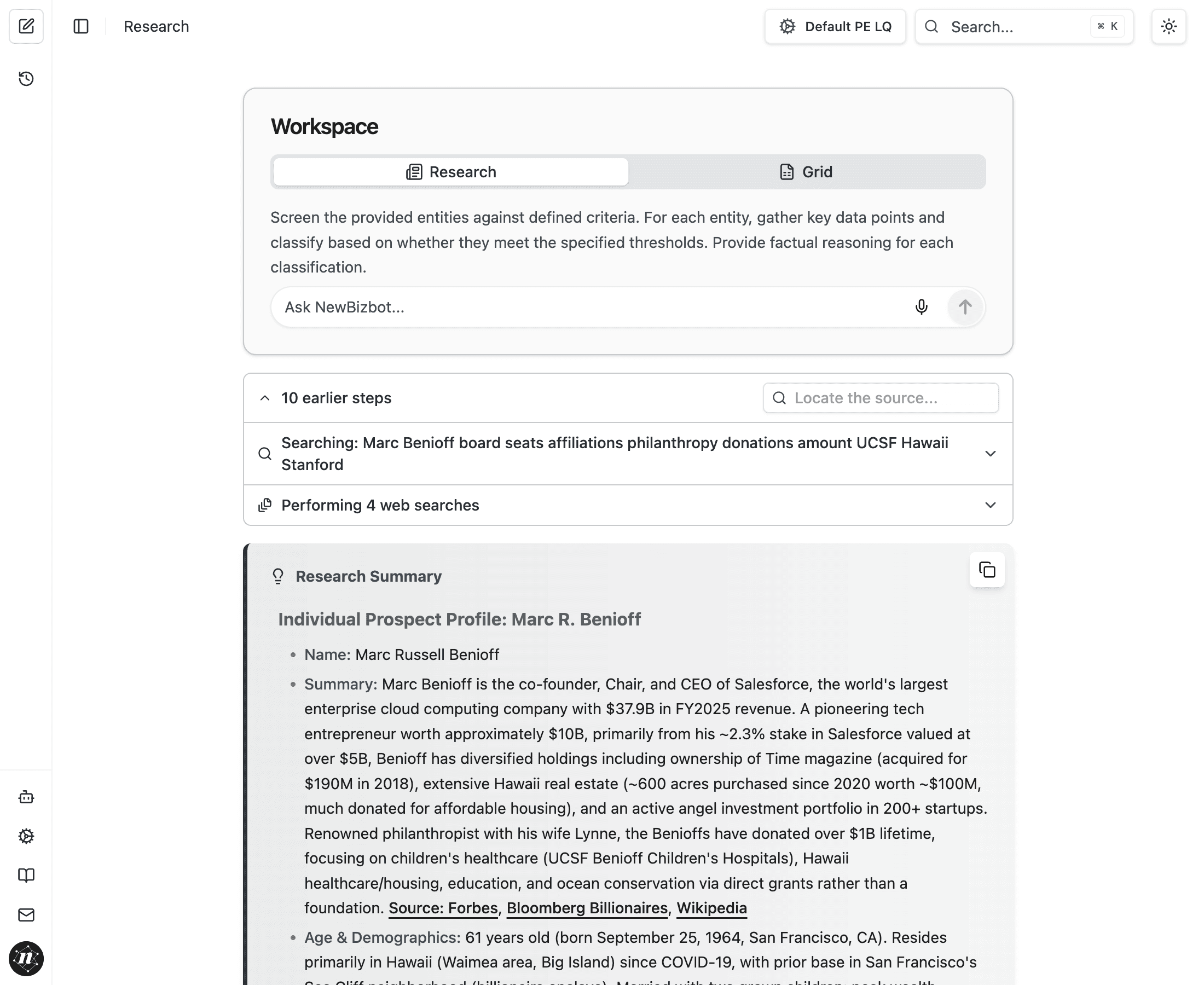
The Research Tools
NewBizBot employs several specialized search capabilities, each optimized for different types of information. The system automatically selects and combines these tools based on your query—you don't need to specify which to use, but understanding them helps you ask better questions.
Web Search
Web Search is NewBizBot's primary intelligence-gathering tool, designed specifically for business research rather than general web browsing. When you research a company or individual, the system generates targeted search queries and executes them across multiple premium search vendors simultaneously.
What makes this different from a standard search engine is the post-processing layer. Raw search results pass through semantic analysis that understands the meaning behind words, not just keyword matches. The system uses embedding models to identify conceptually relevant results even when they don't contain your exact search terms. A query about "private equity fundraising" will surface results discussing "LP capital commitments" or "fund closings" because the system understands these concepts are related.
After retrieval, results undergo re-ranking based on source credibility, information density, and relevance to your specific query. A Dun & Bradstreet profile ranks differently than a blog post mentioning the same company. News from the Wall Street Journal receives different treatment than a press release. This intelligent ranking ensures the most valuable information rises to the top of what the AI processes.
The result is context-efficient intelligence. Rather than processing thousands of mediocre search results, NewBizBot works with a curated set of high-signal sources—typically 15-20 searches yielding around 20,000 words of source material per research query, processed and synthesized in 30-60 seconds.
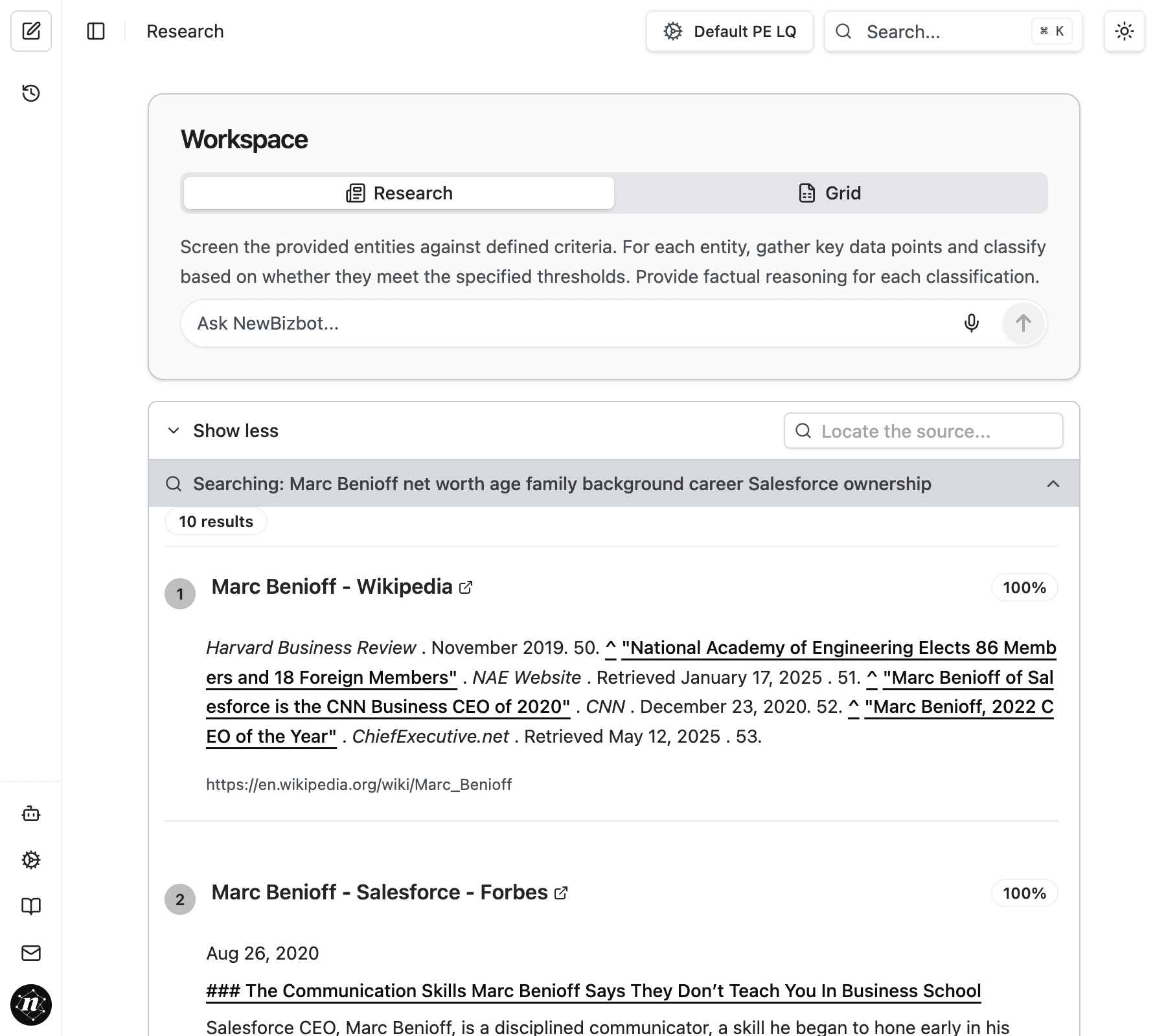
Batch Web Search
When researching multiple entities—common in Grid mode or competitive analysis—NewBizBot deploys Batch Web Search to evaluate companies in parallel rather than sequentially. This dramatically accelerates workflows where you need to qualify or profile dozens of targets.
The batch system implements intelligent early termination. If initial searches reveal that a company clearly doesn't meet your criteria (wrong industry, too small, already acquired), the system moves on immediately rather than completing full research on an irrelevant target. This funnel approach means you get qualified results faster and don't waste processing on obvious mismatches.
Consider the difference in practice: manually researching 20 companies for basic qualification data—revenue, employee count, ownership structure, location—takes 30-45 minutes per company, or 10-15 hours total. NewBizBot's batch search completes the same task in under three minutes, returning structured data with source links for every finding.
Page Read
When Web Search identifies promising sources, Page Read extracts the actual content. This tool navigates to web pages, parses their content intelligently, and extracts the relevant information while filtering out navigation, advertisements, and boilerplate.
Page Read handles various content types: company profiles on business databases, news articles, regulatory filings, LinkedIn profiles, and corporate websites. It understands document structure well enough to extract executive bios from an "About Us" page or financial metrics from an investor relations section.
You'll see Page Read in action when expanding the search process section of your results. Each page the system read appears with a summary of what it extracted and how that information contributed to the final profile.
Source verification matters. Every fact in your research results links back to its source. Click any citation to verify the information yourself—a critical step before using findings in client communications or investment decisions.
Contact Discovery
Finding verified contact information for prospects requires specialized approaches beyond standard web search. NewBizBot's contact discovery capabilities search across email databases, professional networks, and corporate directories to identify email addresses, phone numbers, and social profiles.
Contact discovery integrates with your research workflow in two ways. In Research mode, you can request contact information as part of your query or use the "Find contact information" button that appears after completing a profile. In Grid mode, contact enrichment can run automatically on all qualified entities, giving you outreach-ready data for your entire prospect list.
The system includes confidence scoring and source attribution for contact data, so you know whether an email came from a verified corporate source or a professional database. For detailed guidance on using these capabilities effectively, see the finding contact information guide.
Multimedia Research
YouTube Search
Business intelligence increasingly lives in video format. Earnings calls, conference presentations, executive interviews, and product demonstrations often contain information that hasn't been captured in written sources. NewBizBot's YouTube search capability discovers relevant video content and processes it alongside traditional text sources.
When you research a company or executive, the system searches YouTube for interviews, presentations, and appearances. You'll see these results appear in your findings when video content adds meaningful intelligence—quotes from conference talks, insights from podcast appearances, or product demonstrations that clarify a company's offering.
YouTube Transcript Analysis
Discovering a relevant video is only the first step. NewBizBot can extract and analyze video transcripts, pulling specific quotes, data points, and insights from hours of recorded content. This proves particularly valuable for understanding executive perspectives that haven't been written down elsewhere.
Imagine researching a private company's CEO before a pitch meeting. Public information is limited, but the executive gave a 45-minute interview at an industry conference last year. NewBizBot finds that video, extracts the transcript, and identifies relevant insights about the company's strategy, competitive positioning, and growth plans—information you wouldn't find in any database.
Transcript analysis handles speaker identification when available, so you can distinguish between the CEO's statements and the interviewer's questions. The system extracts timestamps so you can navigate directly to relevant segments if you want to watch the source material yourself.
How Research Flows
Understanding the sequence helps you interpret both the process indicators you see during research and the structure of your final results.
When you submit a query, NewBizBot first analyzes what you're asking for and plans its approach. A query about a well-known public company executive triggers different searches than one about an obscure private company founder. The system identifies what categories of information you need and which search strategies will most likely yield results.
Next, the system generates targeted search queries. Rather than searching your exact question, it creates multiple specialized queries designed to find specific types of information. A profile request might generate separate searches for employment history, board affiliations, real estate holdings, and recent news—each phrased to maximize relevant results.
These searches execute in parallel across multiple search providers. While one query returns company profile data from business databases, another finds news coverage, and another locates regulatory filings. This parallel execution is why comprehensive research completes in seconds rather than the minutes sequential searching would require.
As results return, the system reads and extracts information from the most promising sources. Page Read processes dozens of web pages, pulling relevant facts and noting their sources. The AI synthesizes these findings, resolving conflicts when sources disagree by weighing recency, source credibility, and corroborating evidence.
Finally, the system structures findings according to your configuration's expected output format. Facts are organized into categories, sources are cited inline, and the complete profile presents a coherent narrative rather than a list of disconnected data points.
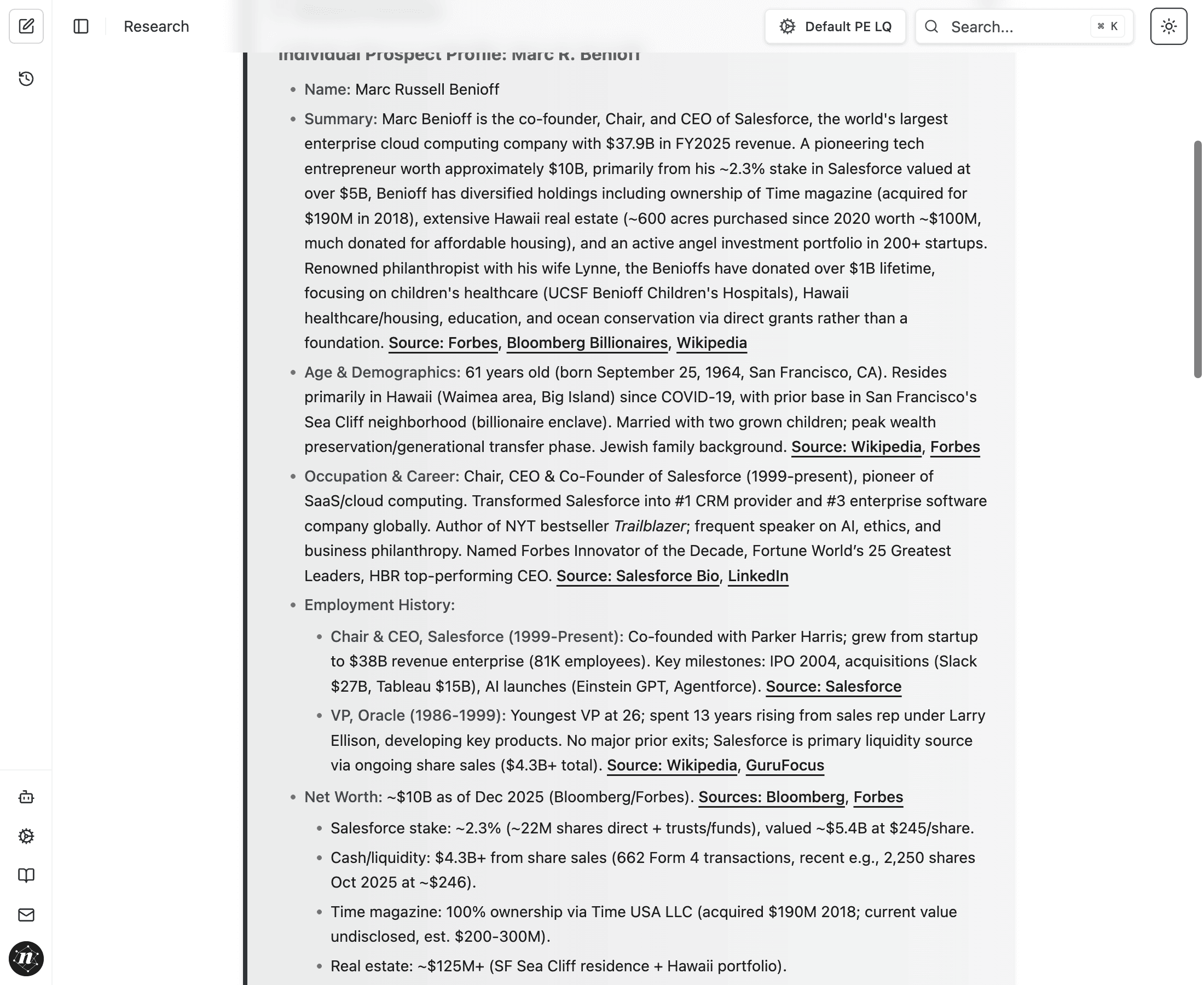
Live Example: Batch Research in Action
The following shows actual search results from a batch research session. Each query targets specific business intelligence—revenue, employee count, ownership structure, and location. Notice how the system queries multiple vendors and retrieves varied source types for each company.
From this batch session, the system extracted key intelligence across six companies: revenue ranging from $795K to $71.6M, geographic concentration in California with eight companies represented, notable growth patterns like ALPHA Landscapes expanding from 4 to 45 employees in five years, and sector diversity spanning construction, consulting, manufacturing, and financial services.
Performance Comparison
The efficiency gains become clear when comparing methodologies:
| Approach | Time Required |
|---|---|
| Manual research | 30-45 minutes per company × 20 companies = 10-15 hours |
| NewBizBot batch search | Under 3 minutes total |
This isn't just faster—it's qualitatively different. Manual research at this scale typically means shortcuts: checking only one or two sources per company, skipping verification, and settling for incomplete data. NewBizBot's parallel processing means you get comprehensive, verified intelligence in less time than it takes to manually research a single company.
When Each Tool Shines
Different research scenarios leverage different tool combinations. Understanding these patterns helps you frame queries that take full advantage of the system's capabilities.
Deep Individual Profiles
Web Search + Page Read dominate, pulling from business databases, news, regulatory filings, and corporate bios.
Batch Company Qualification
Batch Web Search with early termination efficiently filters large lists against your criteria.
Outreach Preparation
Contact Discovery adds verified emails and direct lines to qualified prospects.
Executive Intelligence
YouTube Search and Transcript Analysis surface insights from interviews and conference appearances.
For most research queries, you don't need to think about tool selection. The system intelligently combines capabilities based on what you're asking. But knowing what's possible helps you ask better questions. Instead of "Research Jane Smith," you might ask "Research Jane Smith, including any recent conference presentations or podcast appearances"—and the system will know to emphasize multimedia sources.
Research Quality and Verification
NewBizBot's research process produces more than answers—it produces verifiable intelligence. Every fact in your results links to its source, creating an audit trail that matters when accuracy is critical.
The system handles conflicting information by weighing multiple factors: source credibility, information recency, and corroboration across sources. When Dun & Bradstreet shows different revenue figures than a news article, the system considers which source is likely more authoritative and recent. In cases of significant conflict, results may present both figures with their respective sources, letting you make the final judgment.
This transparency distinguishes NewBizBot from AI systems that generate plausible-sounding text without source grounding. You can verify every claim, trace every data point, and build confidence in your intelligence before acting on it.
Next Steps
Prompt Configuration
Customize how NewBizBot researches to match your industry and workflow
Finding Contact Information
Discover verified emails and direct lines for your research targets
The research process runs continuously in the background as you work. Understanding these mechanics helps you frame queries that leverage the full power of the system—and interpret results with appropriate confidence in what the system found and how it found it.